School of Engineering
Online Resources
Quick access to the tools that keep your engineering education moving forward.
From scheduling an advising appointment to submitting registration forms and connecting with career development, the School of Engineering's online resources put essential services within reach. Browse the sections below to find what you need.

Career Development
It is strongly recommended that students start working with the Office of Career Development as soon as their first year at Manhattan. The Mentor Program is free and highly recommended for first-year students in Engineering.
The School of Engineering has a dedicated career counselor, David Belson. Mr. Belson is certified to:
- conduct formal career assessments (Myers-Briggs Type Indicator® and Strong Interest Inventory®)
- assist you on various career-related questions such as internship research, job, and graduate school opportunities, preparation for interviews and salary negotiations, and more.
Email careerdevelopment@manhattan.edu for career-related assistance.
Registration
How to Register for Courses
To Register for Courses you'll need to complete the following steps:
- Build a Schedule for yourself.
- Fill out a Registration Form. Watch this video tutorial on completing and saving your registration form.
"Print" and "Save as PDF" a copy of your DegreeWorks.
Please make sure to click "Save as PDF" to save your DegreeWorks properly. Please see the red arrow to the left for the placement of the button.
Image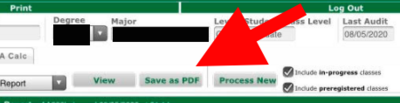
- Consult your curriculum, and build your schedule. You can make an appointment with your advisor for help.
- Submit your schedule for approval by the deadline required and please make sure that none of these classes are in your schedule.
- If your schedule is approved, your hold will be lifted, and you can register on the day designated for your class.
- If your schedule requires an adjustment, your advisor will email you.
- Please check for holds. If you are unsure of how to check for holds, watch this video. To resolve a hold, consult this list of contact information.
First-Year Engineering Student Registration Form Submission (All Majors, and Undecided Students
Chemical Engineering Curriculum and Registration Form Submission
Civil Engineering Curriculum and Registration Form Submission
Electrical and Computer Engineering Curriculum and Registration Form Submission
Mechanical Engineering Curriculum and Registration Form Submission
Center for Academic Success
The Center for Academic Success (CAS) is committed to providing student-centered programs and initiatives designed to enhance learning and promote success for all Manhattan University students.